
How do you produce an annotated photo of a window you are replacing?
- Photo Documentation
- Windows
- Remodeling
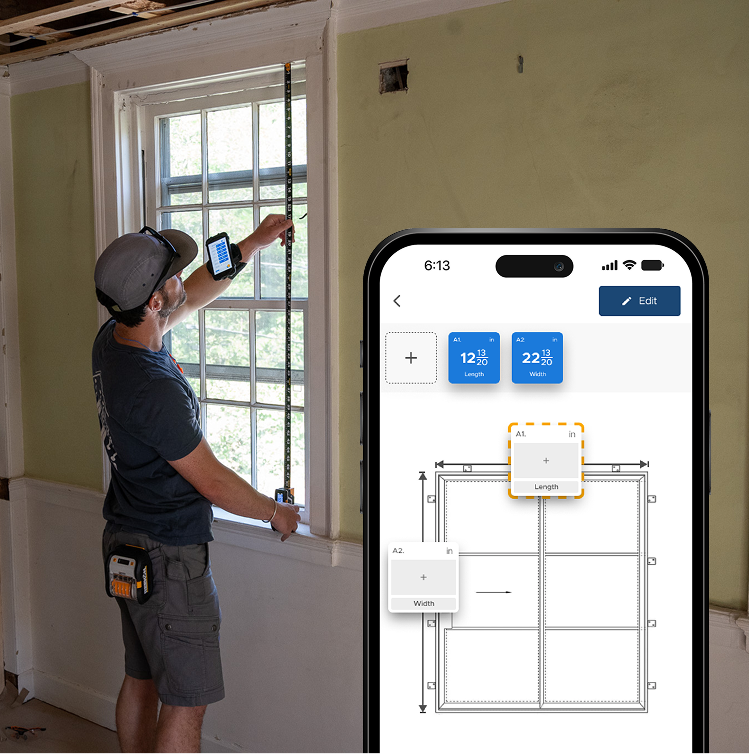
Two numbers in a message could describe any window in the house, which is how the wrong unit gets ordered and nobody can say whose fault it was. Dragging each saved T1 Tomahawk reading onto the photo produces an annotated image of that specific opening. The supplier quotes from a picture with dimensions on it rather than a text you both interpret.
What the annotated photo gives you
- Width and height captured to the app
- Readings dragged onto the canvas
- Each number sits on what it measures
- The supplier quotes from a picture
- Unambiguous about which opening
Take the width, take the height, then drag each saved reading onto the photo where it belongs. What comes out is an annotated image of the actual opening you can send to the supplier, rather than two numbers in a message that could describe any window in the house.
proven favorites
Best Selling Tools
SHOP ALL
BOLDR PRO SOFTWARE
Practical Tools For Every Part Of The Job
Capture measurements with REEKON tools, then use them where the work happens.
100,000+ Customers
Get Started Today
Get more done and reduce errors immediately with REEKON digital measuring tools. Try today risk-free for 30 days and see for yourself.
Reduce Costly Errors
Standardize Workflows
Enter Into Any Software
SHOP NOW