
How do you set the blade width offset on the M1 Caliber?
- Miter Saw
- Accuracy
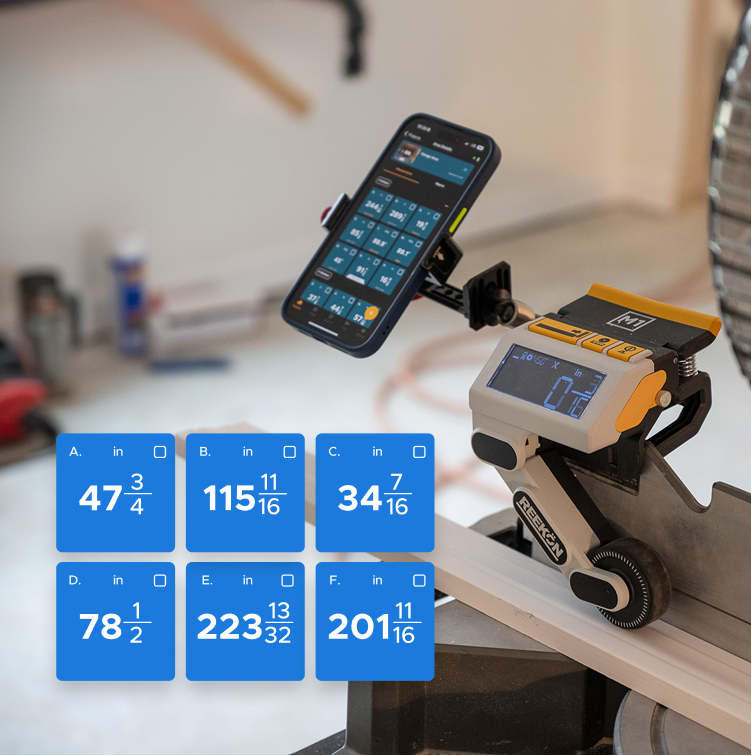
Kerf is the quiet error on a miter saw: zero the readout on the wrong side of the teeth and every piece comes out a blade narrow. The M1 Caliber lets the blade width be entered once, so zeroing sets the display to minus that figure and the cut lands on the number you actually asked for. From then on the reading at the fence is the finished length, which is what makes a run of parts repeatable rather than close.
How the offset gets set
- Touch off on the teeth, not the plate
- Enter blade width on the M1 once, 3/32 inch
- Zero then reads minus the kerf
- The M1 Caliber cuts to the number asked for
- Checked against a tape at 36 inches
The blade is touched off on the left side, on the teeth, and zero is pressed. The blade offset is not yet entered, so it is held, toggled up to three thirty-seconds of an inch and zeroed again, which now reads minus three thirty-seconds. A thirty-six inch cut is made with a split blade, then checked against a tape and comes back at thirty-six inches.
proven favorites
Best Selling Tools
SHOP ALL
BOLDR PRO SOFTWARE
Practical Tools For Every Part Of The Job
Capture measurements with REEKON tools, then use them where the work happens.
100,000+ Customers
Get Started Today
Get more done and reduce errors immediately with REEKON digital measuring tools. Try today risk-free for 30 days and see for yourself.
Reduce Costly Errors
Standardize Workflows
Enter Into Any Software
SHOP NOW